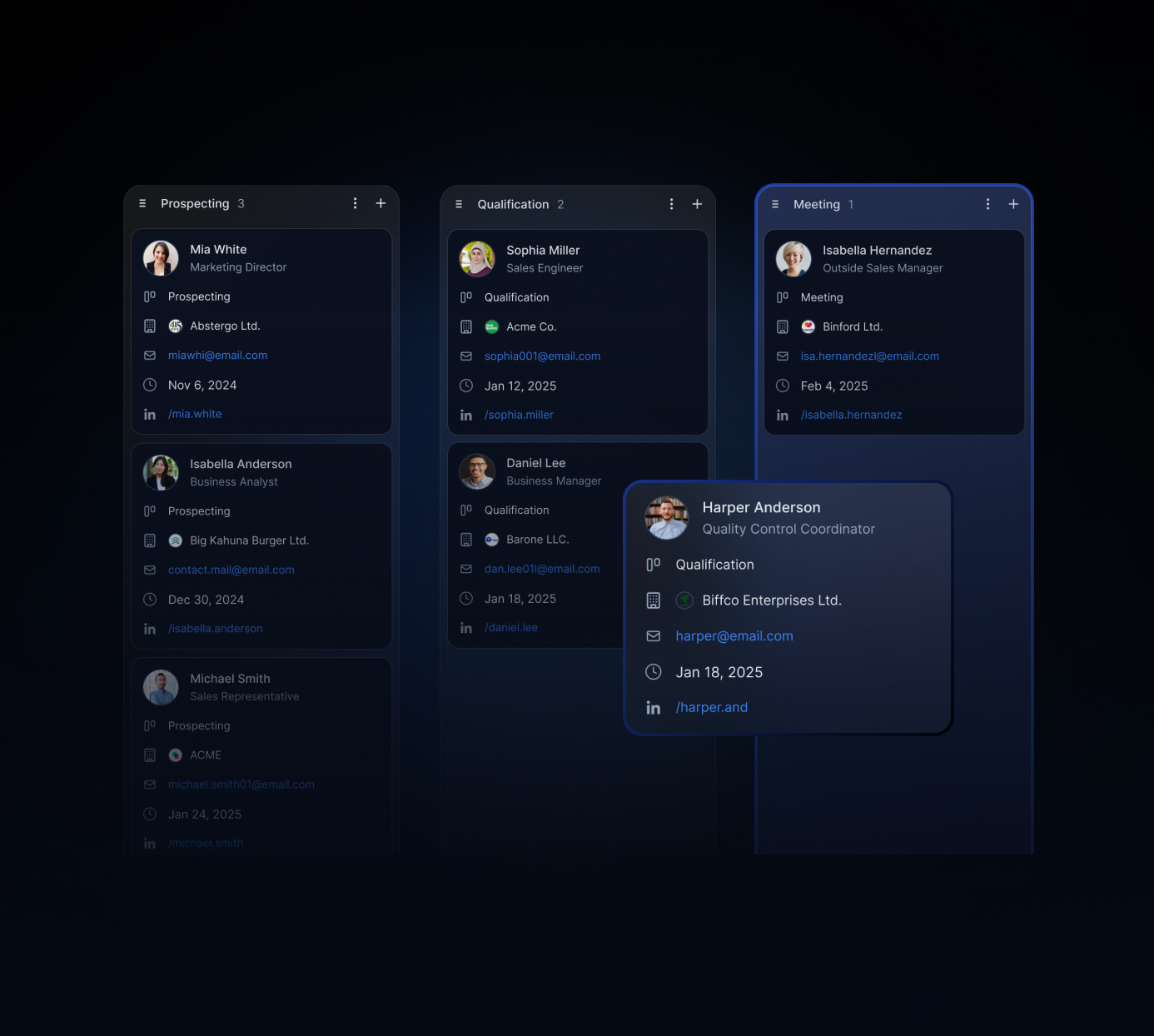
Board Views: A CRM Alternative for Relationship Management
Traditional CRMs are built to move deals through stages. That works well when 90% of your work is pipeline. But for small teams and individuals whose success depends on relationships (partners, candidates, advisors, alumni, investors), deal-stage thinking is the wrong lens entirely.
A kanban board built for contact management works differently. Instead of forcing every connection into an "opportunity," it lets you track relationships by warmth, priority, engagement, or any dimension that reflects how those connections actually develop.
That's the idea behind Board Views: a CRM alternative designed for relationship tracking, not revenue tracking.
Why deal stages don't fit most relationship work
A deal pipeline assumes a linear journey: Lead → Qualified → Proposal → Closed. Relationships don't behave that way.
They warm up, cool down, resurface, and deepen over time. Sometimes the next step isn't a meeting, it's a check-in after a job change. Sometimes the "win" is staying visible for two years until the timing is right.
Forcing that into deal stages creates two problems:
You end up with dozens of contacts stuck at "Qualified" or "Meeting Booked" with no real next action
The CRM stops reflecting reality, so nobody updates it, and the data becomes unreliable
The fix isn't a better pipeline. It's a different model.
Board Views as your kanban CRM for contact management
Board Views work the same way kanban boards do in project management: columns represent stages, cards represent contacts, and you move them as the relationship progresses.
The difference is what those stages mean.
In a sales CRM, stages measure sales progress. In a relationship-first board, stages measure relationship depth: Warm, Active, Dormant, Re-engage. Or timing: Now, Next Quarter, Long-term. Or trust: Introduced, Connected, Trusted, Deep Partner.
You define the columns. The board reflects your actual relationship tracking system, not a vendor's idea of how a deal should move.
This is what makes Board Views useful for teams that aren't running a sales process: founders managing investor relationships, HR teams building a hiring bench, BD teams nurturing partnership opportunities before they become formal conversations.
Board views vs. deal-stage CRMs: what's actually different
It's worth being specific about what changes when you switch from a deal-stage CRM to a relationship board.
HubSpot / Salesforce | Notion (DIY) | Board Views in Rolodex | |
|---|---|---|---|
Designed for | Sales pipelines | Anything you build | Relationship management |
Default stages | Lead → Deal → Closed | None (fully custom) | Fully custom, relationship-first |
Contact history | Per-deal record | Manual notes only | Shared across team, timeline view |
Follow-up reminders | Sales task system | Manual or none | Keep in Touch reminders built in |
Team visibility | Per rep, siloed by default | Shared if configured | Shared network by default |
Best for | Sales teams | Solo or technical users | Small teams managing relationships |
HubSpot and Salesforce are excellent for what they're built for. They're not built for relationship management that doesn't end in a closed deal.
Notion gives you the flexibility to build anything, but you're building and maintaining it yourself. That overhead adds up as your team grows.
Affinity is purpose-built for relationship intelligence but priced for enterprise teams, at roughly $166/user/month, it's out of reach for most small teams who just need a clean kanban view of their contacts.
Board Views give you the relationship tracking structure without the sales overhead or the cost.
The relationship-first setup that makes boards work
The setup that works for most teams is simpler than it looks.
One board, one relationship type. Don't try to manage partners, candidates, investors, and advisors on the same board. Create a separate board per relationship category. Each one can have its own stage logic.
Stages that reflect relationship status, not actions. "Sent email" is an action, not a stage. "Warm" or "In conversation" is a stage. Use stages to answer "where is this relationship right now?", not "what did I do last."
A column for relationships to revisit later. Every board needs a "check back in 3 months" or "resurface later" column. Without it, contacts that aren't ready right now just disappear from view.
Context on every card. Boards are more useful when each card shows notes and recent activity at a glance. A card that just shows a name isn't much better than a spreadsheet row.
6 relationship-first boards small teams run
Once the structure is in place, the same kanban approach applies across very different relationship types.
1) VIP Relationships Board (your top 25–50)
Your most important contacts, organized by engagement level: Active, Drifting, Needs Attention. The goal is a quick weekly review, who haven't you spoken to in 60+ days who should hear from you?
2) Partner Targets Board (relationships before partnerships)
Tracks potential partners through the stages that precede a formal agreement: Met, Interesting, Deep Conversation, Exploring Fit, Active Partnership. Most of this happens before a deal ever gets signed.
3) Hiring Bench Board (keep great people warm)
Strong candidates who weren't the right fit right now. Stages might be: Saved, In Touch, Warm, Ready to Engage. The goal is maintaining relationships between active hiring, so you're not starting from scratch each time.
4) Investor Outreach Board (track trust, not just meetings)
Investors move slowly. A board that tracks relationship depth (Intro Made, Consistent Updates, Warm Interest, Actively Considering) is more honest about where things stand than a pipeline that implies a transaction is imminent.
5) Alumni Network Board (turn goodwill into a system)
Former employees or colleagues, organized by how active the relationship is: Strong Alumni, Occasional Contact, Lost Touch. Alumni networks are an underused source of referrals and talent when they're maintained deliberately.
6) Advisors Board (lightweight governance, real relationships)
Active advisors, board members, and mentors tracked by engagement: Onboarded, Regular Check-ins, Occasional, Needs Reconnect. Keeps advisor relationships from slipping into passive agreements that don't deliver much.
How to set up your first relationship board in 10 minutes
If you haven't used Board Views before, here's the simplest place to start.
Step 1. Pick one relationship category. Not all of them, one. The VIP board or a partner targets board is a good starting point for most teams.
Step 2. Define 4–5 stages. Think about where a relationship can be at any given moment. Avoid stages that describe your actions ("emailed," "called"). Use stages that describe relationship status ("warm," "active," "dormant").
Step 3. Add 20–30 contacts. Pull from your existing contact list, LinkedIn connections, or email history. Don't try to import everything, start with the relationships that actually matter.
Step 4. Place each contact in the right stage. This is the useful part: you'll quickly see which relationships have been neglected and which are active. Most teams find this step alone is clarifying.
Step 5. Set a follow-up reminder for anyone in "needs attention." This is what separates a working relationship tracking system from a spreadsheet that goes stale, reminders tied to the contacts who need them.
The whole setup takes less than 15 minutes. The ongoing maintenance, reviewing and moving cards, takes 10–15 minutes per week.
Why this is a CRM alternative, not a CRM feature
Most CRMs have added "relationship" features over time, activity tracking, contact scoring, notes fields. But they're built on top of a deal-stage core.
That creates a mismatch. The system is optimized to answer "is this deal going to close?", not "is this relationship healthy?" The reporting, the views, the defaults all point toward revenue.
A relationship board starts from a different question: who matters to our work, and are we staying connected to them in a way that reflects how we actually operate?
That's a different kind of contact management. And it needs a different kind of tool.
If your team has tried HubSpot or Affinity and found it too heavy for the work you're actually doing, a lightweight kanban setup for relationship tracking is usually the better fit. Less setup, fewer fields to maintain, and a view that reflects how relationships actually work, not how sales cycles do.
Start with one board this week
Board Views work best when they replace the mental overhead of tracking relationships across your head, a spreadsheet, or a CRM that doesn't quite fit.
The simplest version: pick your top 30–40 contacts, create four stages, and review it on Fridays. That's enough to stay on top of the relationships that matter without building a complicated system.
If the model works for one relationship category, you can add more boards for other use cases, hiring, partnerships, investors, advisors, each with its own stage logic.
The goal isn't a perfect CRM setup. It's a relationship tracking system that reflects how you actually work.