Visualize Your Professional Network: Four Views in Rolodex
Your professional network is bigger than you think. Most teams have hundreds of meaningful connections spread across individual inboxes, LinkedIn accounts, and calendar histories: people met at conferences, worked with at previous companies, introduced through mutual contacts. Those relationships are real. The problem is that no one on your team can see them all at once.
When contacts live across five different tools and there is no shared view of who knows whom, relationship-driven work becomes guesswork. Introductions get missed because no one knew the path existed. Outreach goes cold because no system flagged the timing. Follow-ups happen when someone remembers, not when a contact is ready to hear from you.
Rolodex gives teams a shared way to visualize their professional network. This is not a CRM pipeline; it is network management software that consolidates your team's contacts into one workspace and lets you see your full relationship landscape through four different views: Lists, Board View, Map View, and Org Chart. Each view answers a different question about who you know and how to act on it.
Why professional networks stay fragmented and what it costs you
Most professional networks are not invisible because the relationships are weak. They are invisible because the data is spread across too many places.
One partner's network lives in Gmail. Another's is on LinkedIn. An associate has a spreadsheet of contacts from a previous job. The investor a colleague knows well is in someone's calendar but nowhere shared. No one is wrong for storing contacts this way. There is just no system that brings the full picture together.
What this costs in practice: a warm path that exists goes unused because no one knew to look for it. Two teammates reach out to the same contact in the same week because there is no shared activity log. A new hire rebuilds relationships that a departing colleague spent two years warming.
A relationship intelligence platform changes that. When your team's email, calendar, and LinkedIn connections are consolidated into one shared workspace, the full network becomes visible and searchable. You can see who knows whom, how strong the connection is, and when the last touchpoint happened, before deciding who sends the first message.
Four ways to visualize your professional network in Rolodex
Lists, segment your network by what matters
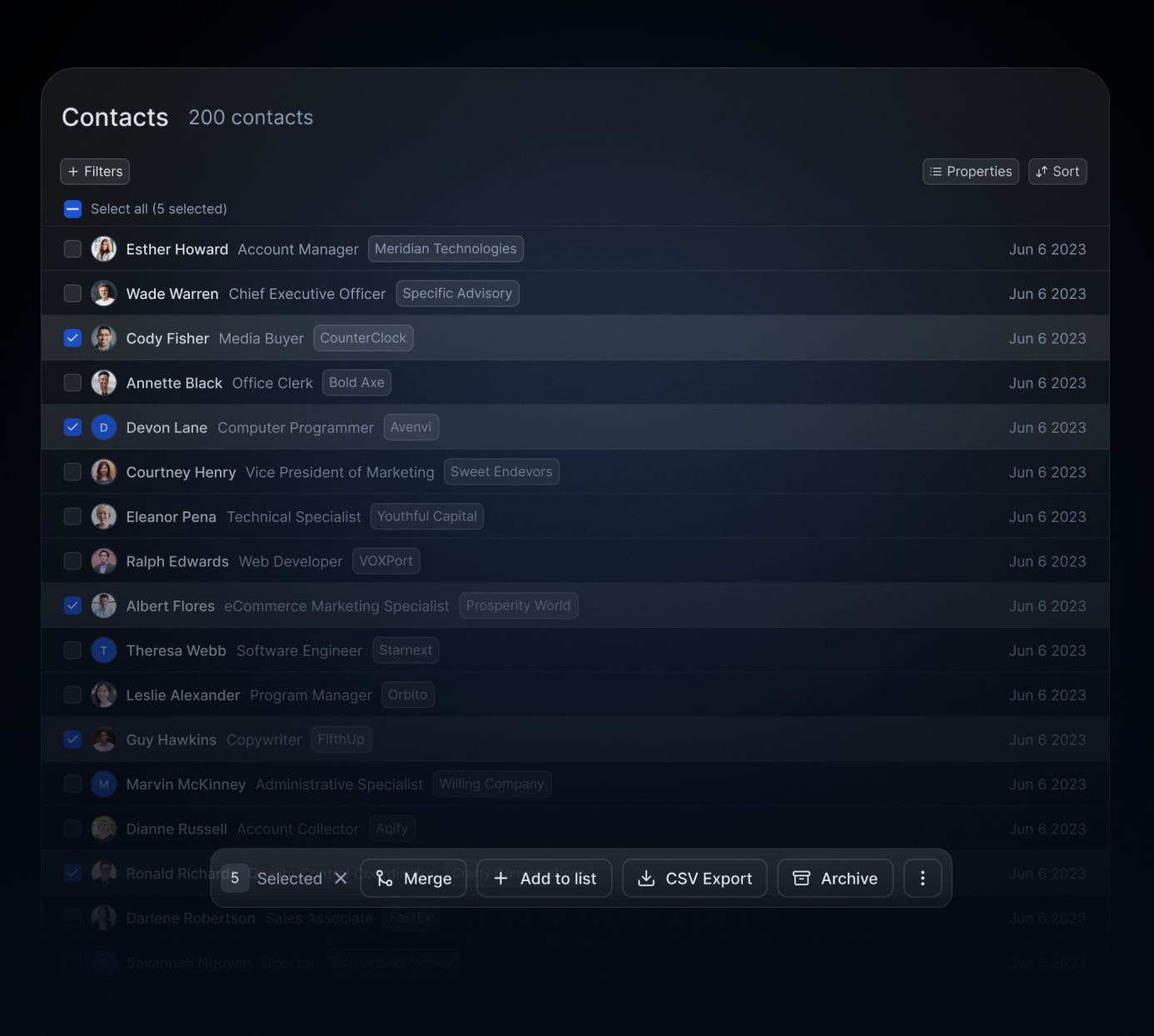
Lists let you organize contacts by any combination of tags, custom fields, location, industry, seniority, or relationship status. A list can be as broad as "all contacts in fintech" or as specific as "decision-makers at Series B companies in London who attended our event last year."
The value of lists is that they make segments visible on demand. A team managing a fundraise can maintain a list of warm investor contacts with status notes on each. A recruiting team can maintain a pipeline of passive candidates organized by function and relationship warmth. Lists are the foundation that the other three views build on.
Board View, track relationship workflows and follow-ups
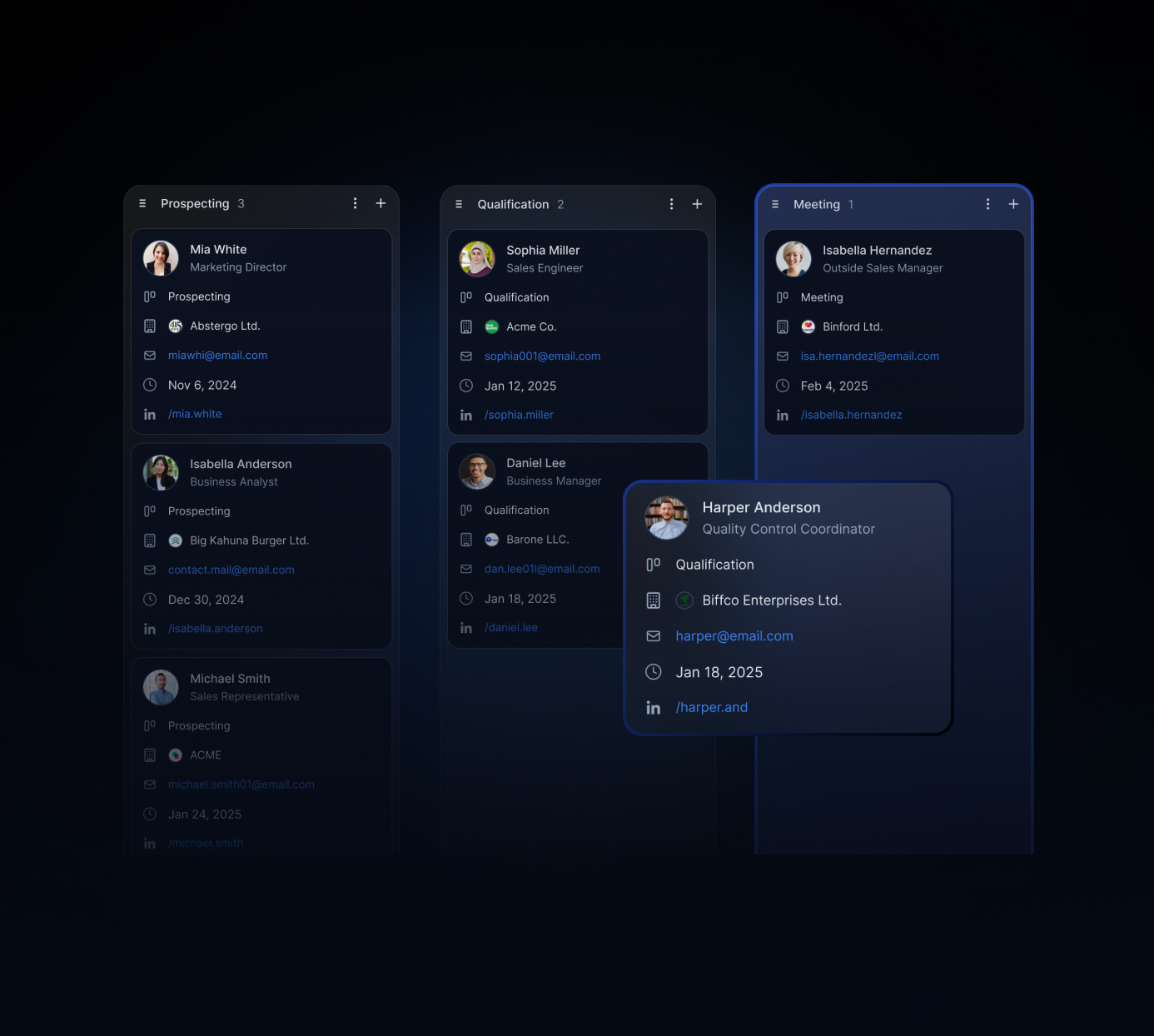
Board View transforms any list into a Kanban-style board with columns you define. The columns can map to whatever workflow the team is running: Identified, Reached Out, Intro Sent, Meeting Booked, Outcome. Or: Target Account, First Contact, In Conversation, Closed. Or: Candidate, Screening, Offer, Hired.
Board View makes relationship progress visible at a glance and creates a shared follow-up system. When everyone can see which contacts are in which stage, nothing falls through the cracks because a teammate is out or moves on. The board is the accountability layer that replaces "I thought you were following up on that."
Map View, see who's where before you travel
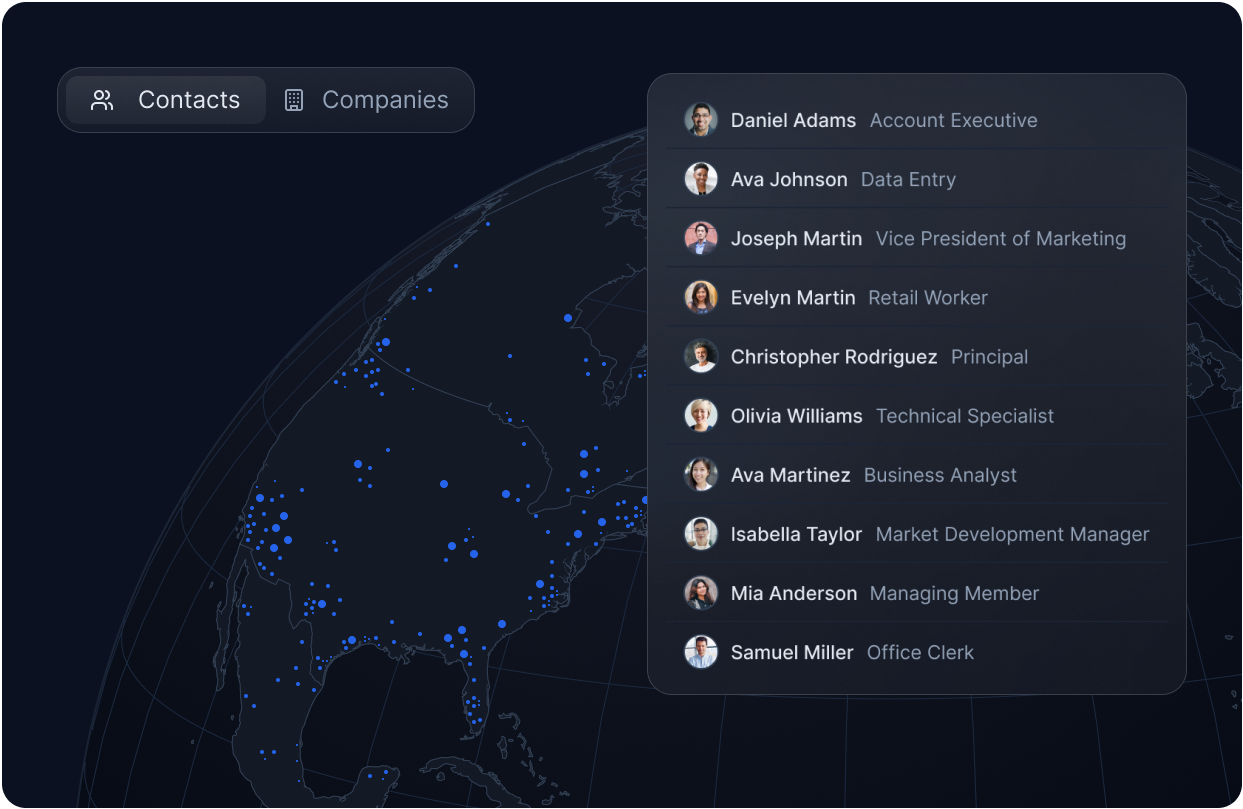
Map View plots your contacts geographically. Filter by any list, tag, or segment and see where your team's relationships are concentrated. For anyone who travels for work or plans events, dinners, or conference attendance, Map View turns a trip into a structured outreach opportunity rather than an improvised one.
Instead of asking "who do I know in Amsterdam?" and getting a partial answer from one person's memory, Map View gives the full picture across the team. The Map View tactics guide covers the workflow for building a meeting roster from a travel schedule, including how to stack dinners around cluster meetings for efficient road trips.
Org Chart, map account structures and find warm paths in
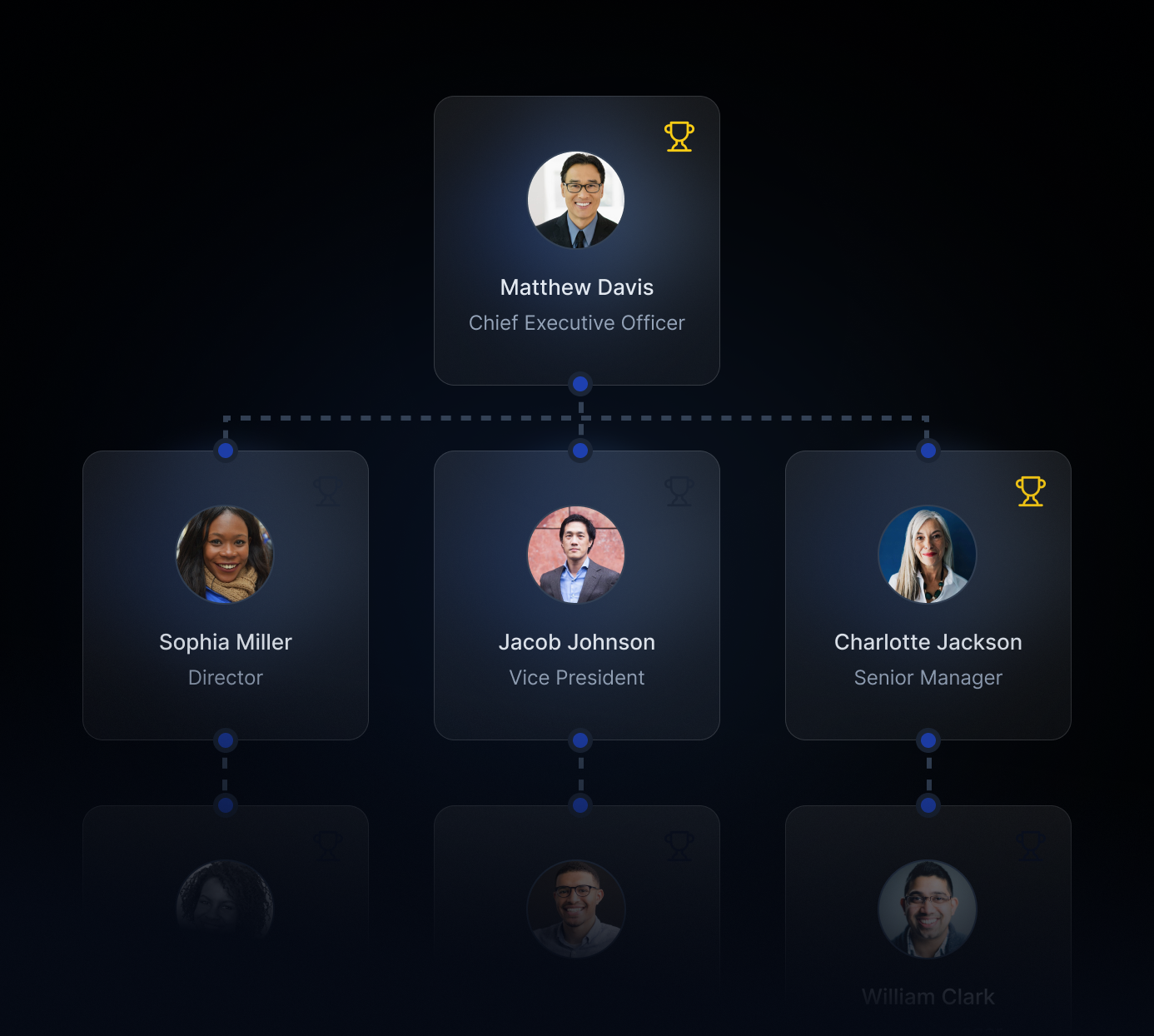
Org Chart visualizes the relationship structure inside any company or account. It shows who holds which role, how stakeholders connect to each other, and who on your team has a warm path to each person in the chart.
For teams doing account expansion, Org Chart is the antidote to single-threading. When all of your access runs through one contact, you are one personnel change away from starting over. Org Chart surfaces other stakeholders reachable through a warm introduction from someone on your team, so multithreading becomes a structured process rather than a cold outreach campaign. It is what "org chart CRM" means in practice: relationship mapping inside accounts, not just deal tracking.
How to find warm introduction paths through your team's shared network
Seeing your network is the first step. Acting on it is the second.
The most valuable thing a shared network view reveals is introduction paths you did not know existed. A target contact who looks like a cold reach from one person's perspective is often a warm introduction away when the whole team's network is visible. Rolodex shows who on your team has the strongest existing connection to any contact, based on frequency and recency of interactions, so the right person makes the first move.
A warm introduction converts significantly better than cold outreach because it transfers trust. The recipient is not evaluating a stranger; they are responding to a referral from someone they already know. The complete guide to warm introductions covers the double opt-in mechanics and forwardable templates that make introduction requests easy to act on.
Rolodex also fires Title Alerts when contacts in your shared network update their role or company on LinkedIn. A contact who just stepped into a new position is in a window where a well-timed follow-up from someone they already know lands differently than any cold message could. How to turn job changes into warm outreach covers how to use those signals systematically across your team's full network.
Network management software, not a pipeline tool: how Rolodex fits your stack
Rolodex is not a CRM alternative in the sense of replicating what a CRM does. It is a relationship intelligence platform that fills the gap a CRM leaves: the relationship work that happens before a contact enters a pipeline, and the relationship maintenance that happens after a deal closes.
A traditional CRM tracks opportunities, attributes revenue, and forecasts quarters. What it does not track is who on your team knows whom, which relationships have gone warm or cold, or when a contact's job change makes them newly open to a conversation. Rolodex tracks exactly those things.
For teams that run a CRM for pipeline tracking, Rolodex sits alongside it as the network visibility layer. For teams not running a formal pipeline, consulting firms, VC funds, recruiting teams, partnerships leads, it functions as the primary contact management software without requiring pipeline structure at all. How relationship intelligence platforms and CRMs work together covers the complementary stack in more detail.
See your professional network as a team, not as a collection of individual lists
Most teams have more relationship capital than they realize. The problem is not the size of the network. The problem is visibility, who can see which parts of it, and how to act on it when it matters.
Rolodex consolidates your team's contacts from email, LinkedIn, and calendar into a shared workspace where everyone can see the full network, find warm paths to any contact, and track relationship progress together. Four views, Lists, Board View, Map View, and Org Chart, give you four ways to answer the question: who do we know, and what should we do next?
Sign up for Rolodex and see your team's professional network in one place.